dominoGuru.com
Your Development & Design Resource
LotusLive Notes Contacts Sync on Lotus Notes 8.5... and why you should care!
03/03/2009 12:38 PM by Chris Toohey
I had the opportunity recently to speak with Sean Poulley - Vice President of Online Collaboration Services at IBM - about LotusLive - a Business 2.0 service offering that is far beyond "yet another social network".
Expect to see an article on the whole conversation, discussing things that customers and business partners should know about LotusLive, later this week... but today's post discusses one of the key phrases that I was introduced to while speaking with Poulley: onsite product portfolio.
See - LotusLive is only partially a cloud service! One of the intentions is to allow you to seemlessly integrate the onsite product portfolio with the ever-expanding LotusLive services portfolio - allowing you to better leverage (not abandon) your current technology investments in the Lotus brand.
One of the integration points that's available today is the LotusLive Plug-In for Lotus Notes 8 (LotusLive Login Required).
I'll give you a visual companion to the directions supplied by the LotusLive Support Team via the LotusLive Engage Support FAQs, and when complete you will be able to push and synchronize your Lotus Notes Contacts with your LotusLive Contacts!
Perform the following instructions on the workstation where you have Lotus Notes installed.
1. Using a text editor, open the following file:
Notes Install Directory\framework\rcp\plugin_customization.ini
The Notes Install Directory is usually C:\Program Files\IBM\Lotus\Notes
2. Perform one of the following steps:
If the following line is not present, then add it to the end of the file:
com.ibm.notes.branding/enable.update.ui=true
If the line is present, make sure that the value is equal to true.
3. Save the file and close your text editor.
4. Stop and restart Lotus Notes, if it is running.
These steps are required for the initial setup of any of these plug-ins in the Lotus Notes 8.n Client. If you're setup TwitNotes, Document Viewer, et al, I think you can skip these steps...
Next, go Lotus Notes and perform the following instructions.
1. Select File > Application > Install. The Features Update box displays.
2. Select Search for new features to install, and then click Next. The Application Location box displays.
3. Click the Add Remote Location... button, and then add the following:
Name: LotusLive Updates
URL: https://apps.lotuslive.com/install/lotuslive_notes_plugin/site.xml
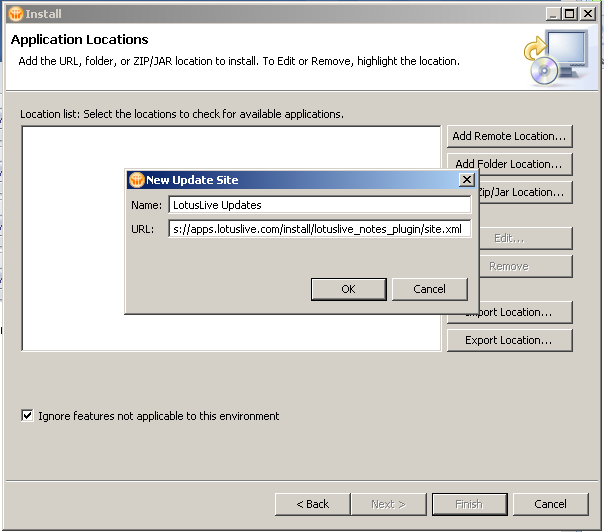
4. Click OK to continue. LotusLive Updates displays in the list of locations.
5. Click Finish and a new window displays.
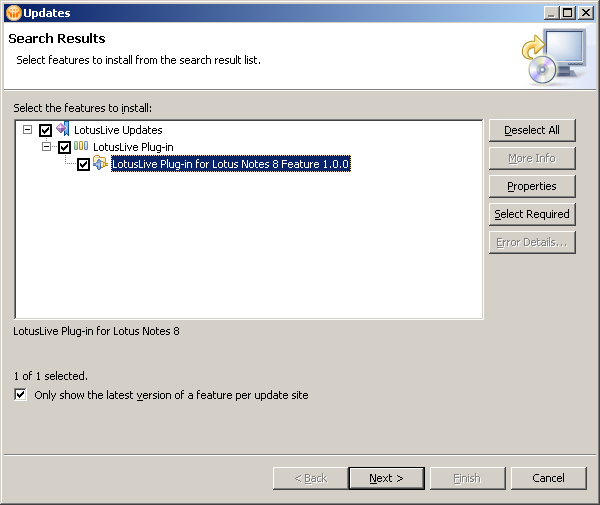
6. Select the check box for LotusLive Updates, and click Next.
7. To continue, you must accept the license agreement, and click Next.
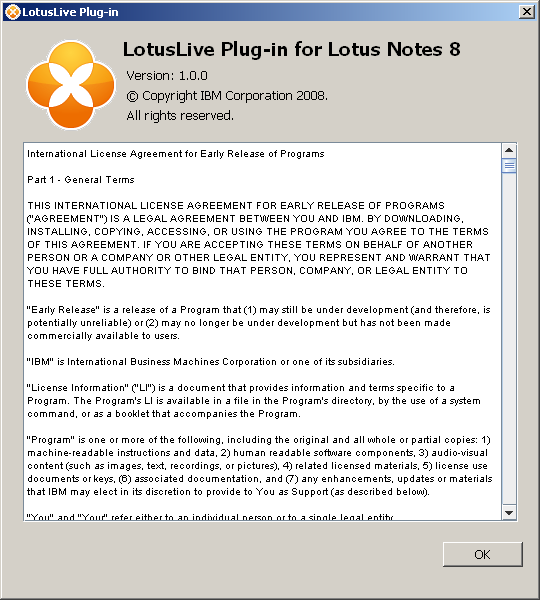
8. Click Finish. If a window displays about trusted signers, you must select Install this plug-in and OK to continue.
9. Select Yes when a message to restart Lotus Notes displays.
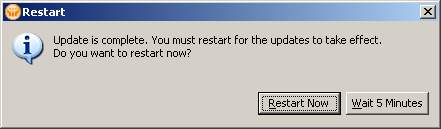
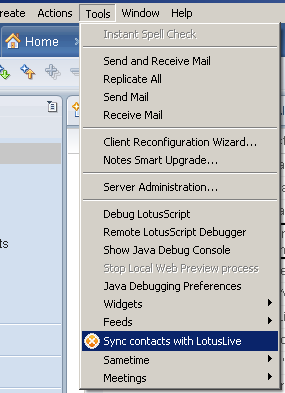
Now that you've installed this plug-in.. you'll want to use it! Simply select Tools\Sync contacts with LotusLive from the Lotus Notes Client File Menu.
If all's fine in the world, you will be prompted for your LotusLive User Name and Password credentials:
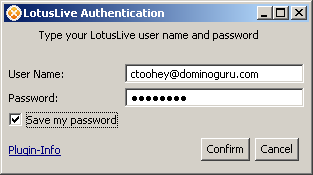
Author's Note: If you were originally a bluehouse.lotus.com user and your account was ported to LotusLive, change your account password via LotusLive Administration. Apparently (as I - and several others - experienced this exact issue) those ported accounts would allow us to access LotusLive.com, LotusLive Sametime and LotusLive Connections (even via the Activities sidebar), but thus plug-in only accepted authentication credentials post-account password change.
Once you've successfully authenticated, your Lotus Notes Personal Address Book Contacts will be pushed to the LotusLive Contacts list, and any changes with those contacts updated!
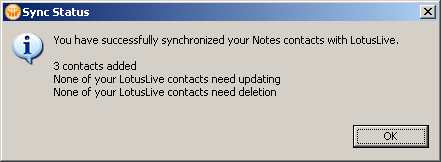
This is not only a pretty slick feature on it's own, but it should both show you where LotusLive can go once you understand integration with the onsite product portfolio, as well as give customers and business partners ideas on how they can make their own products integrate either with other cloud services or specifically with LotusLive.
See... it's stuff like this that makes me giddy: Lotus Notes is being positioned/has the potential to be positioned as the solution that binds cloud service offerings, in-house custom application development efforts, and thus the single functional dashboard to a customer's world!
If you're not already signed up, I suggest checking LotusLive out. And while you're there, feel free to make me a connection!

About the author: Chris Toohey
Thought Leadership, Web & Mobile Application Development, Solutions Integration, Technical Writing & Mentoring
A published developer and webmaster of dominoGuru.com, Chris Toohey specializes in platform application development, solutions integration, and evangelism of platform capabilities and best practices.
More from dominoGuru.com
Latest Features








dominoGuru.com is powered by IBM Notes Domino XPages & hosted by Prominic.NET
Contact Us
Use our Contact / Feedback form or one of these email addresses:

Except where otherwise noted, dominoGuru.com by Chris Toohey is licensed under a Creative Commons Attribution-ShareAlike 4.0 International License.